

Posted: September 16, 2020
Posted: June 2, 2020
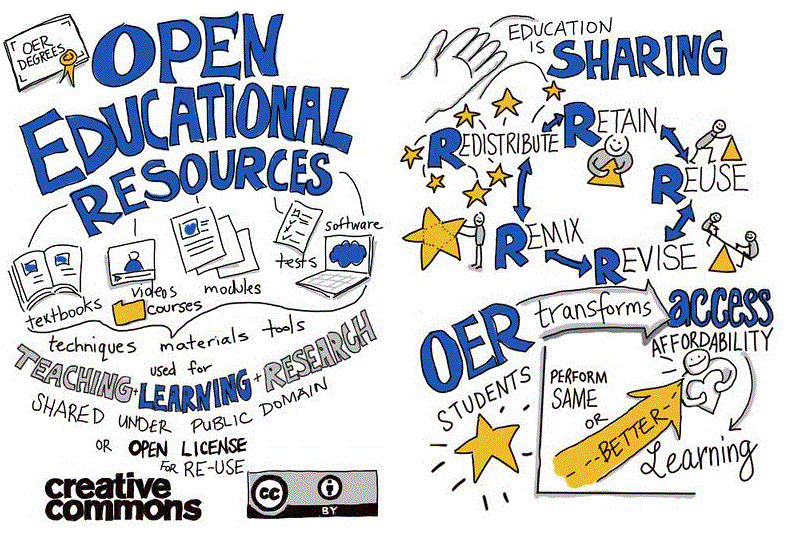
With the COVID-19 pandemic driving college courses into online learning environments, open educational resources (OER) are essential tools for educators because they allow instructors to reuse, remix, revise, redistribute, retain, resources without expense, and without seeking copyright clearances for use, and adaptation of the material. Through collaboration with educators who contribute their subject matter expertise, Open Educational Resources provide a sustainable and customizable option for delivering online teaching methodology.
OER Development at RRC
You may have seen past information from Red River College on its work to drive OER development. The Teacher Education department at Red River College is in the midst of creating an Open Education Resource that will supplement Teacher Education courses and Faculty Development on post-secondary campus’ across Manitoba and Canada.
In partnership with Campus Manitoba and the Manitoba Flexible Learning HUB, a framework for the resource was developed.
For more information on the project visit the OER Project page or view the following video:
How do I use Open Educational Resources?
Most OER resources are digital and can be embedded into the campus’s learning management systems (LEARN). Like using any teaching and instructional material the first step is finding Open Educational Resources that support your subject area. The Library can be a key ally in assisting you with sourcing OER content for your subject area and you can also explore resources on your own.
The library has an OER landing page to get your started finding OER’s to meet your instructional needs. Once you find a resource you would like to use you can download it, adapt it to your needs, and upload it in LEARN or you can link to a completed OER’s online.
How Open Educational Resources Support Students.
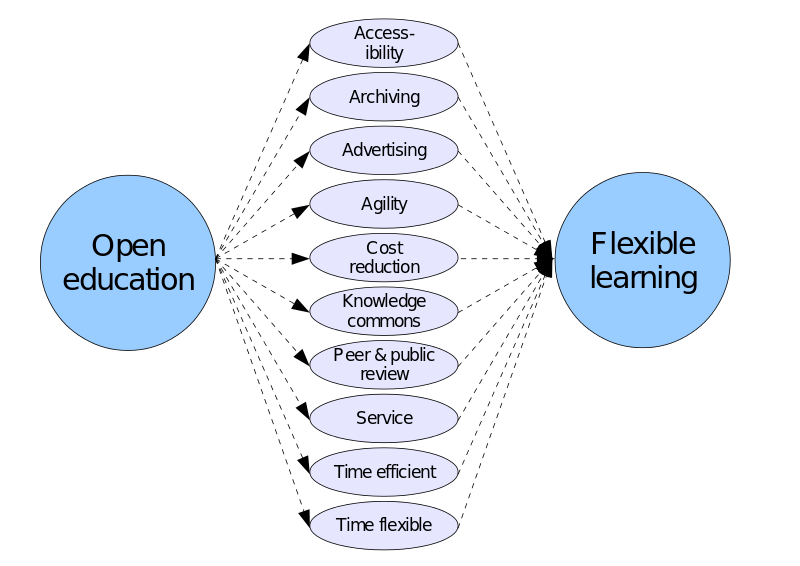
Use of OER’s helps to reduce the cost of educational resources for students. As textbook costs continue to rise OER’s can provide free or low cost alternatives to textbooks. The use, creation, and adaption of OERs in teaching and instruction can also provide enhanced opportunities for self-learning at home.
OER’s can act as engaging tools to develop digital literacy skills for: searching, reusing, recreating, disseminating, branding, and networking as you can involve students directly in the adaptation of the resource as part of their learning.
Jtneill – Own work – Ways in which open education can facilitate flexible learning. CC BY-SA 3.0
OER’s supporting strategic goals on campus.
Use of OER’s can also tie your teaching into the strategic goals on campus. These resources can be Indigenized, to advance Indigenous achievement. Indigenization is a process of incorporating Indigenous perspectives, processes and knowledge systems. It must be noted that Indigenization does not mean replacing Western knowledge or changing it, rather the goal is to braid together Western and Indigenous knowledge so teachers and learners can appreciate both. OER’s can be freely adapted for valuable inclusion of Indigenous knowledge systems and perspectives. For more guidance on Indigenizing resources view this post from Campus MB which has some OER content to get you started. Further to the strategic goals OER’s can incorporate digital tools to help evaluate student success. They foster sustainable growth by encouraging digital learning materials, and curb the increasing cost of instructional materials. They can be used to cultivate strategic partnerships as you can invite alumni and industry partners to contribute to adapting OER’s. Get started investigating OER’s today with the RRC Library and Campus MB, and look for more OER sessions in Fall 2020.
Posted: April 27, 2020
The past five weeks have been an absolute whirlwind with transitioning from the in-class learning environment to online. As a student, the sudden change meant having to figure out how to learn in a virtual environment, how to facilitate presentations through new tools, figure out a way to stay focused on school work, and manage the stress of a being a student during a global pandemic. It’s no easy feat adapting to this amount of change.
So, like any challenge, I think it’s important to celebrate the victories when they come. Here are some of the things that helped me stay focused during this trying time.
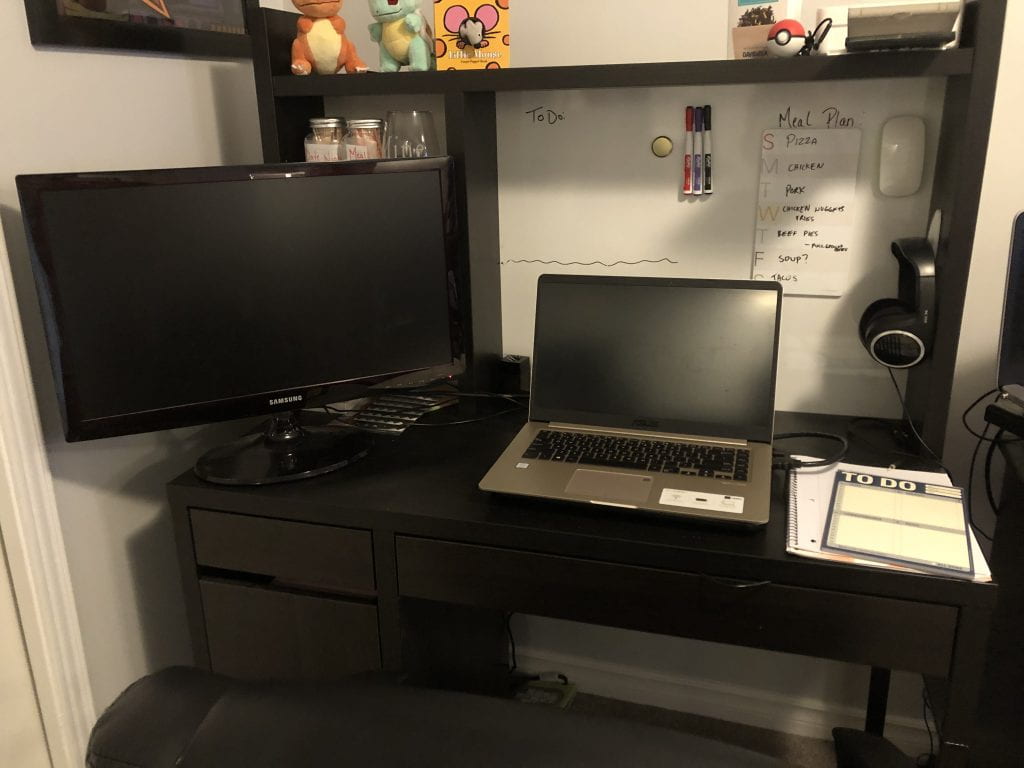
The first week that we started classes online, I felt displaced and couldn’t quite figure out a way to stay focused on my studies. I recognized that I was struggling to balance my study time with my home time and as a result, I felt quite restless. By the second week, I recognized that bringing my laptop with me as I moved around my home wasn’t working, so I decided to set up a work station. I cleared my computer desk of all things not school related and set up a second monitor to attach to my laptop, which created a dynamic work space with two screens.

Meagan’s work station
Setting up a work station created a dedicated space for me to focus on my work, and the result has made a drastic difference. When I am done my online classes for the day and I’m no longer working on homework, I can turn off my computer and step away from my work station. This gave me the balance I needed to separate my time spent on schoolwork and my downtime.
In the second week of online classes, I was fortunate enough to have my husband start working from home too. I decided that setting up a schedule was my next step in staying focused, and since I was waking up to his alarm anyways, I started mimicking his work schedule for my classwork. Luckily, his schedule fit perfectly with my class times and forced me to take proper lunch breaks. I have found that since working with a dedicated schedule, I can set clear goals for what I want to accomplish in my day, and I’m more productive because I set these parameters.
These are only two small steps that made a significant impact on my learning from home. If you are looking for ways to keep focused while studying at home, check out the Working from Home – Students guide.
It’s also important to recognize that everyone learns differently, so if you want to share what has helped you study in the COVID-19 pandemic, we’d love to hear from you on Twitter or chat with a library staff member using our online service desk.
While the Library’s physical doors are closed, the online service desk is still running and ready to serve you. Staff are online during the following hours:
During this time, a staff member is available to chat or answer your email. Simply visit library.rrc.ca and click on the Ask Us button or send an email to library@rrc.ca.
Written by: Meagan Acquisto, Library Information and Technology program
Posted: April 16, 2020
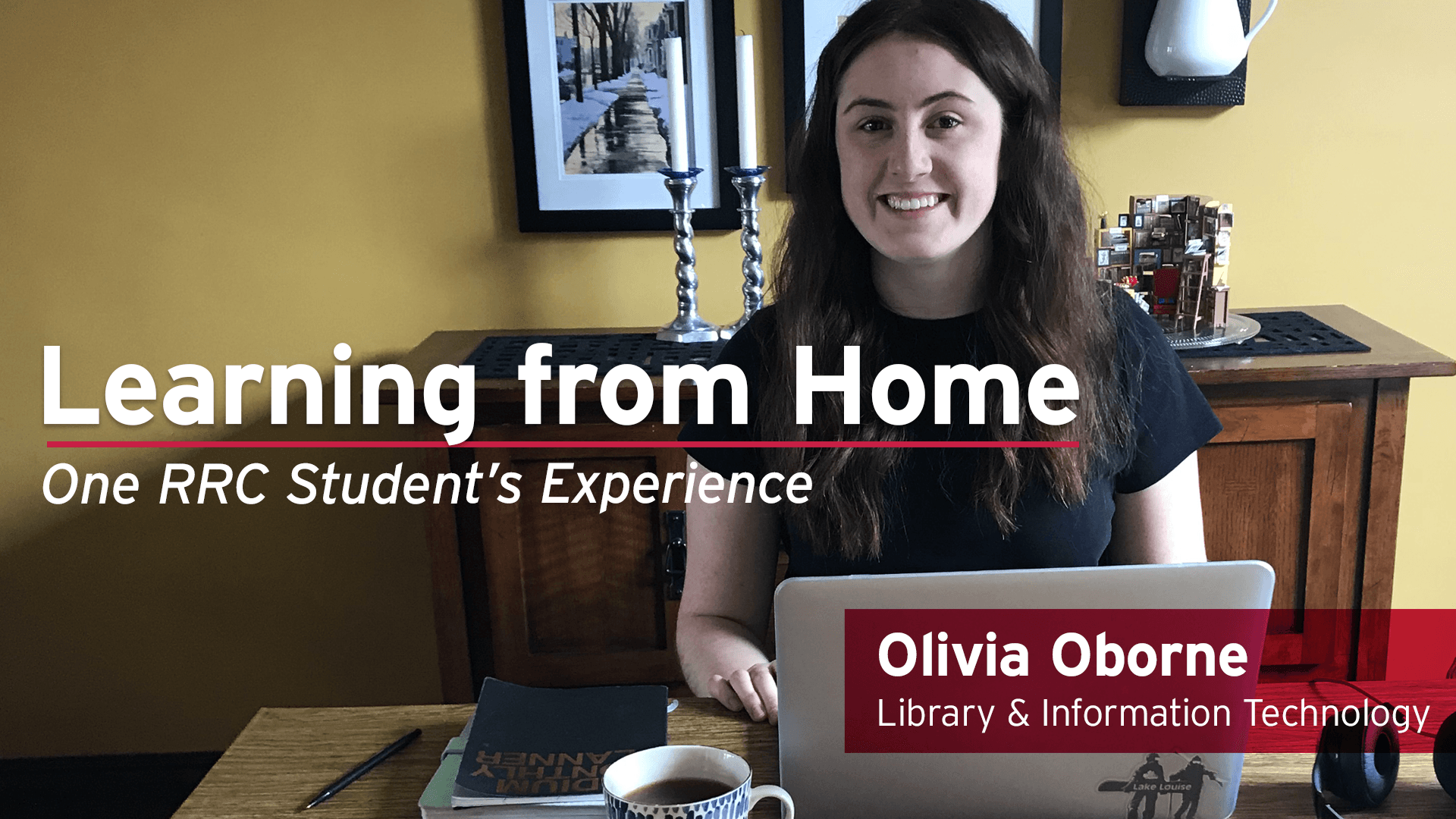
The past four weeks have been a learning experience like no other. At different times, I have felt disoriented from my loss of structure, frustrated with technological problems, and distracted by the uncertainty of the future. On the other hand, I have also forced myself to work on the art of time management, been proud of my organization skills, and felt tremendous support from my classmates. Here are some of those triumphs from the past few weeks.
My class is made up of very few people. As a result, we have grown quite close over the past two years. When it was decided that RRC would be shifting to online learning due to the COVID-19 outbreak, I was scared about what that would mean for our classroom dynamic.
What I have found is that we are staying connected and closer than ever. With frequent questions, library memes, and positive words flowing through our WhatsApp group chat, we are able to maintain the support system that we created in the classroom. Looking for ways to connect with your peers? Check the Working from Home Guide for Students for some tools you can use!
I was thinking this past week about the positives that could come from this uncertain time. Specifically, in regard to the many of us who are going to be finished our programs and heading out into the working world: a scary thing to do even without a global pandemic. What came to mind is that though this situation is oftentimes overwhelming, it has allowed us to learn skills that we may never have otherwise discovered.
For example, we may have learned how quickly and effectively we can adapt to new situations and circumstances. More than that, we may have learned new ways to present information. Above all, we learned that we can efficiently work and finish projects in a time of crisis. These are all skills that we can attest to in future job interviews when they come.
Want to share your learning triumphs in the COVID-19 pandemic? Reach out to us on Twitter or chat with a library staff member using our online service desk.
While the Library’s physical doors are closed, the online service desk is still running and ready to serve you. Staff are online during the following hours:
During this time, a staff member is available to chat or answer your email. Simply visit library.rrc.ca and click on the Ask Us button or send an email to library@rrc.ca.
Written by: Olivia Oborne, Library Information and Technology student
Posted: April 7, 2020
We all know that change can be difficult, especially during a time of so many unknowns.
As Red River College shifts to an online course environment, that means we need to change our study habits and change the way we access resources.
In response to the changes to Red River College’s learning environment, the Academic Success Centre and the Library have created an Adjusting Study Habits During COVID-19 document with tips to help students adapt the way they study.
The tips in the document include how to:

As we are all adjusting to an online course environment, our advice is to be patient and to take care of your wellbeing first, then try out the suggested tips.
While the Library’s physical doors are closed, the online service desk is still running and ready to serve you. Staff are online during the following hours:
Monday – Thursday 7:30am – 8:00pm
Friday 7:30am – 4:30pm
Saturday 8:30am – 4:00pm
During this time, a staff member is available to chat or answer your email. Simply visit library.rrc.ca and click on the Ask Us button or send an email to library@rrc.ca.
Posted: March 25, 2020

Photo by Markus Spiske from Pexels
COVID-19 information is everywhere you look lately: TV, radio, newspapers, government briefings, social media, friends, etc. If you are looking for in-depth, scholarly information, the Library can help point you in the right direction. Use these resources to find current reliable information.
UpToDate is a clinical support database for medical and health professionals. It offers recommendations based on current medical information, which are evidence-based and authored by physicians. View these peer-reviewed search results for COVID-19 (log in to your Red River student or staff account to access any of the links below).
CINAHL gives you access to over 750 nursing and allied health journals including full-text, peer-reviewed articles. You will also find lessons and evidence-based care sheets. The following link takes you to the latest full-text, peer-reviewed articles on COVID-19: COVID-19 or “novel coronavirus” Need help searching? Email or Chat with Library staff.
Cochrane Library includes systematic reviews, clinical trial reports and evidence to inform and support decision-making for health care professionals. Cochrane has a special collection on Coronavirus (COVID-19): evidence relevant to critical care. There is also a special collection for Coronavirus (COVID-19): infection control and prevention measures. Keep tuned to Cochrane as they have the following special collections in development:
Medline is a database created by the U.S. National Library of Medicine which contains authoritative information on medicine, nursing and more. The following search contains current, full-text, peer-reviewed articles on covid-19 or coronavirus or 2019-ncov.
The Library can assist you with finding the latest, authoritative information on COVID-19 or any other topic you are researching. To contact us, email the Library at library@rrc.ca or visit library.rrc.ca and click on the Ask Us button. In addition, the Library’s broad selection of online books, videos, and journals may be accessed 24/7 through OneSearch (RRC log in may be required).
Written by Lynn Gibson, Library Services
Posted: March 18, 2020

Photo by Kat Jayne from Pexels
Library staff understand that we are in an extraordinary situation with the COVID-19 outbreak which is affecting everyone in the College community. We are working remotely during our closure, to help students find and use online resources, and assisting instructional staff with resources and other Library supports. Staff are available through Chat and Email during the following hours:
Mon-Thu 7:30am – 9:00pm
Fri 7:30am – 4:30pm
Sat 8:30am – 4:00pm
You may access our online books, videos, and journals 24/7 through OneSearch (RRC log in required).
For information about online services provided by Academic Success Centre, please visit ASC’s Online Academic Supports website. General news and updates about Library Services will be posted at library.rrc.ca.
We are all experiencing increased levels of stress, including learning how to work and learn remotely, care for children and elderly relatives, study in Canada while being far from home and family, and of course being concerned about our own health and welfare.
There are ways to help reduce stress and combat isolation which you may find valuable, such as mindfulness and meditation strategies, fitness apps and virtual social gathering. RRC’s Healthy Minds, Healthy College initiative provides some resources for maintaining physical and mental fitness during this time of social distancing.


The College’s Counselling Services will have staff available through phone, email and WebEx to address your concerns. Visit their page for more information at rrc.ca/counselling/.
Answers to many of your questions can be found on the College’s Coronavirus information page which is being updated continuously.
Knowing the facts about COVID-19 helps reduce stress from rumors and false information. Health Canada has up to date information to keep you informed. Additionally, the World Health Organization has extensive information on the virus. Locally, check Manitoba Health for updates.
Looking for up to the minute information? Reuters.com, Reuters Canada and the Associated Press are reliable news sources.
The World Health Organization’s Mental Health Considerations during COVID-19 Outbreak provides strategies for maintaining mental and psychological well-being.
Additionally, the Centers for Disease Control and Prevention provides tips to Manage Stress & Anxiety during this uncertain time.
Lastly, the Canadian Mental Health Association is a reliable source of stress reduction information. Check out their publication Coping with Stress which is free online and the Stress Index quiz. The Mood Disorders Association of Manitoba offers Self Care strategies also.
Posted by Lynn Gibson, Library Services
Posted: October 4, 2019

Posted: October 2, 2019
In an age of information overload, it’s easy to consume as much as we can without considering where it came from or what the consequences might be. It can take long enough just to read a piece of information, let alone to verify it and decide whether or not it holds any water.
This year’s Media Literacy Week theme is Break the Fake, and the Library wants to help you make breaking the fake news cycle a little less daunting and a little more empowering. Here are 4 tips to help you break the fake!
Perhaps the most obvious way to make sure what you’re reading is true is to confirm the facts being presented. There are many fact-checking websites that do this regularly so a quick pit-stop after reading a news story is sometimes all it takes to debunk fake news. Here’s a list of useful fact-checking websites:
You can also do a general Google search of the story with the word “hoax” after it to see if any other sources might have questioned a news item’s credibility.
Keep in mind that if a fact-checker hasn’t debunked something, it doesn’t automatically make the story true. It just means that the story hasn’t been fact-checked yet. Not every story gets verified by fact-checkers so while it’s important to be aware of these websites, it’s important to be aware of their limitations as well.
Want more quality fact-checkers? Click here for an extensive list of fact-checkers from all over the world that have committed to the International Fact-Checking Network’s code of principles.
It’s important to understand where something originally came from before you decide to trust it. A news story shared on social media almost certainly wasn’t published there, or it might be based entirely on someone else’s story. Fortunately, it often only takes a few clicks to find your way to the original source.
On social media, the link is usually found at the bottom of the post. On a website, look for key phrases like “according to” or “reported by” that indicate where the information came from.
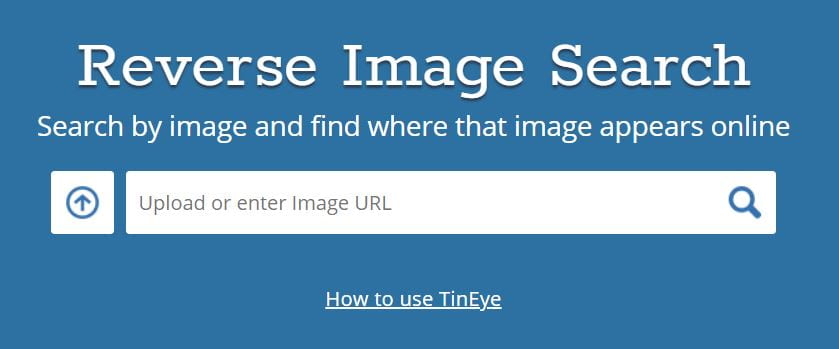
For images, use a reverse image search tool like TinEye or Google Images. Upload the image or paste the image’s URL into the search bar to get a list of results where that image has been found.
To get the image URL, right-click the online image and select “Copy image address.” Alternatively, right-click the image and select “Properties,” then copy the URL provided. Filter the results from oldest to newest to see when and where the image was first published.
*If you’re using Google Chrome you can search the image by right-clicking the image and selecting “Search Google for image.”
Follow the trail until you’ve found the original source!
When it comes to breaking fake news, we have to determine whether or not the original creator is trustworthy. Even if that information was shared with us by trustworthy family or friends, we shouldn’t assume that they checked the facts themselves. Instead, we should verify the original source ourselves first, then decide whether or not it’s reliable.
Here’s 3 questions to determine if a source is reliable:
It’s become easy to create fake websites that look far more credible and professional than the actual content that they produce. Don’t assume their “About Us” page is necessarily true either. Use a far-reaching website like Wikipedia or Google to see if others have found them to actually exist. Don’t forget to make sure that these “others” actually exist themselves.
Just as it’s easy to create fake websites and content, it’s easy to pose as someone who actually does exist online. If you know the source exists, be sure the information is coming from them and not an impostor.

Look for indicators that verify who they are. Twitter and Instagram verify users by putting a blue check mark next to their name on their profile.
Make sure the source has a reliable process for producing information and a good track record for providing it accurately. Do they make mistakes? More importantly, do they admit to them and correct them when they do? Are they experts on that topic? Are they willing to publish information that their owners or readers would disagree with? Answering these types of questions can help you determine where the source’s interests lie and whether or not they should be trusted.
To make sure you’re getting the whole story, check other news sources to see how they covered the event or topic. This is a great way to see if what you read omitted any important information. It’s also an effective way of highlighting any possible bias that a source might have.
Using the “News” tab when doing a Google search is an easy way to narrow down results to real news outlets when looking for other sources.
*Find it faster! Use Control-F (Command-F on Macs) to jump to a keyword or phrase in an article.
You can also try to find the consensus view on the topic (what most experts agree to be true). If the story is only sharing information that experts agree to be false, you’re likely reading misinformation.
MediaSmarts has created a custom search to help you find the consensus view on specialist topics like science and medicine. You can try it out here!
Now that you’re equipped with these tips and tools, go ahead and put them–and the news you come across–to the test. While you might not be able to stop fake news from being published, you can stop it from spreading.
Want to learn more? Check out MediaSmarts, a not-for-profit that develops digital and media literacy programs for Canadians, or go to the “How to Evaluate Websites and Online Resources” guide to explore some of the Library’s resources on the topic.
More of a hands on learner? Play the Reality Check game to test your skills and learn some new authentication techniques.
Posted: October 2, 2019
RRC Library is committed to challenging colonialism and working towards reconciliation on this National Day for Murdered and Missing Indigenous Women & Girls by remembering and respecting our Indigenous sisters. If you would like to see resources on this topic check out our MMIWG library guide.
Find the MURDERED AND MISSING INDIGENOUS WOMEN AND GIRLS guide here:
or
Other guides you may find interesting:
Guides are curated web pages created by our library staff. Many people who are starting to explore a topic aren’t sure where to start – there are so many options and it can be overwhelming.
Guides are a starting spot for students looking for more information on a particular topic in the collection. A guide will typically include featured books and journals (both print and electronic), databases, Videos (DVDs and streaming) and websites. They may also include specialized information specific to the topic (i.e. WHIMIS or resources specific to an assignment).
Do not hesitate to contact guide owners (information is on the guide) if you have any suggestions to improve this guide (content or special interest areas) or stop by the library – we would love to hear from you. If you would like to see a specific guide for a particular topic please let us know.
We encourage you to share this resource with your students, include it on your Learn site and help us promote this Library tool.
RRC Polytech campuses are located on the lands of the Anishinaabeg, Ininiwak, Anishininwak, Dakota Oyate, and Denésuline, and the National Homeland of the Red River Métis.
We recognize and honour Treaty 3 Territory Shoal Lake 40 First Nation, the source of Winnipeg’s clean drinking water. In addition, we acknowledge Treaty Territories which provide us with access to electricity we use in both our personal and professional lives.