Information Technology Solutions

Install PaperCut on your Mac

RRC Polytech uses PaperCut print management software, allowing you to install, access, and use RRC networked printers on your Mac.

NOTE: If you use Windows or Android, open the Install PaperCut on your device webpage for your specific installation instructions.


Install PaperCut on your Mac

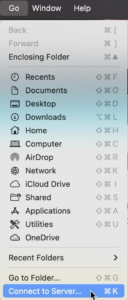
  1. On the top menu bar, click Go.
    Click Go
  2. On the submenu, click Connect to Server.
    Click Connect to Server
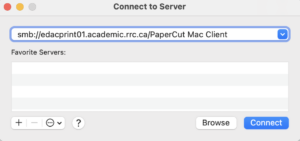
  3. In the Server Address field, enter smb://ndacprint01.academic.rrc.ca/PaperCut Mac Client for the Notre Dame Campus, or smb://edacprint01.academic.rrc.ca/PaperCut Mac Client for the Exchange District Campus, and then click Connect.
    Server Address Field
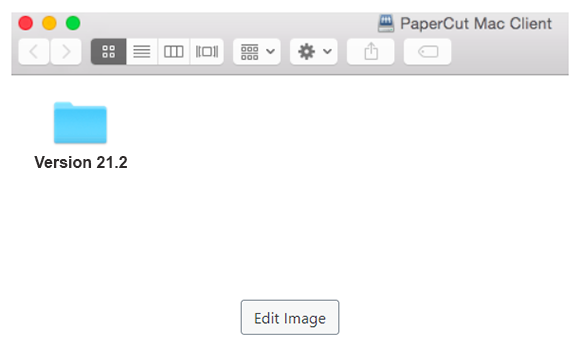
  4. Click the Version 21.2 folder.
    click blue folder called version 21.2
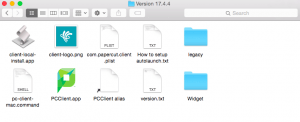
  5. On the left side of the top row, click the client-local-install—app icon.
    click icon on top left called client local install app
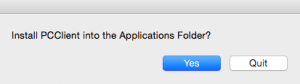
  6. On the Install PCCClient into the Applications folder window, click Yes.
    click yes to install the pccclient
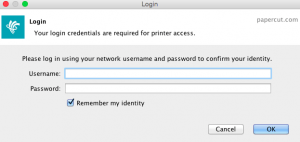
  7. Log in with your College username and password, and then click OK.
    type in username and password and click ok
  8. Click the Details link in the PaperCut balance window (top right of your desktop) for your balance, your recent print jobs, and add credit.
    PaperCut balance window opens top right hand side

Two additional steps

NOTE: After installing PaperCut on your Mac, you must complete two additional steps in order to print documents from your device.

  1. Open the Student PaperCut webpage for instructions to add credit to your PaperCut account and for more PaperCut features.
  2. Open the Install a College printer on your Mac webpage to print from your device.


← Back to Student Printing

RRC Polytech campuses are located on the lands of the Anishinaabeg, Ininiwak, Anishininwak, Dakota Oyate, and Denésuline, and the National Homeland of the Red River Métis.

We recognize and honour Treaty 3 Territory Shoal Lake 40 First Nation, the source of Winnipeg’s clean drinking water. In addition, we acknowledge Treaty Territories which provide us with access to electricity we use in both our personal and professional lives.