
VPN allows you to remotely access RRC Polytech resources that are not accessible outside the Corporate network.
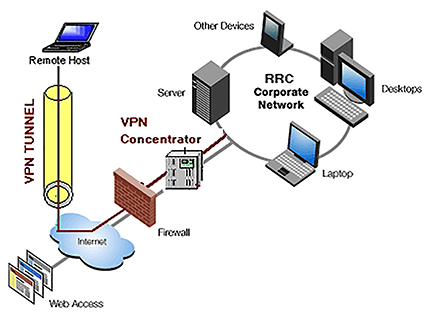
VPN is an abbreviation for Virtual Private Network, which is a network that provides secure remote access to an enterprise network.
VPN Client software allows you to connect to the RRC Polytech network from an off‑campus computer over the Internet using your RRC log on credentials. It also provides extra security by encrypting data to and from your computer.
RRC Polytech uses the Cisco Secure Client (formerly known as Cisco AnyConnect Secure Mobility Client). The client should already be installed on your laptop.
You must already be connected to the Internet through an Internet Service Provider (such as Shaw, Bell, or Bell MTS) and have the Cisco Secure Client installed on your laptop. If both of these apply, click Cisco Secure Client in the system tray at the bottom right‑hand corner of your taskbar, and then click Connect.
Log on to your RRC-issued computer with your RRC log on credentials, and then click Access VPN with a non-RRC laptop..
RRC Polytech campuses are located on the lands of the Anishinaabeg, Ininiwak, Anishininwak, Dakota Oyate, and Denésuline, and the National Homeland of the Red River Métis.
We recognize and honour Treaty 3 Territory Shoal Lake 40 First Nation, the source of Winnipeg’s clean drinking water. In addition, we acknowledge Treaty Territories which provide us with access to electricity we use in both our personal and professional lives.